
Export Contacts
Exporting contacts in Benchmark downloads your contact data as a CSV file that you can open in Excel or Google Sheets or keep as a backup. You can export all of your contacts at once or export a list.
Topics Covered In This Article
Before getting started
- Benchmark exports contacts as a CSV file.
- Lists in Benchmark are segments built from criteria. A list export includes the contacts that match the list's criteria at the moment you export.
Exporting all contacts
Use this option to export all contacts from your Benchmark account.
- Select Contacts in the main menu.
- Click on the More (3 dots) option.
-
Click Export.
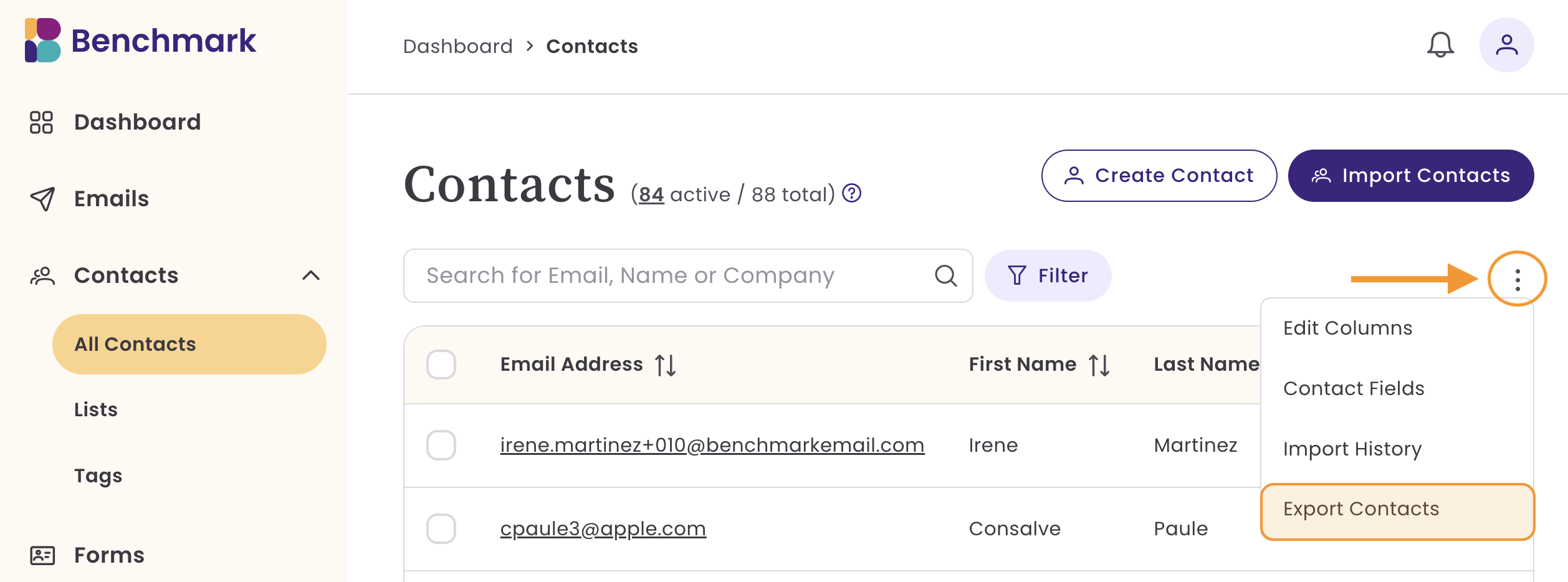
All of your contacts and their contact data will be downloaded immediately.
Large exports may take a few minutes to process.
Export contacts from a list
Use this option to download only the contacts that belong to one list.
- Click Contacts, then select Lists.
- Select the list you want to export. Selecting the list will show new options.
- Select Export Contacts.

All of your contacts and their contact information will be downloaded immediately.
File Name
When exporting contacts, the file name depends on your export selection:
- Multiple lists or all contacts: The exported file is named
exportedContacts.csv. - A single list: The exported file uses the list name.
The exported file is saved to your computer’s designated download folder, which is often the Downloads folder.
TIP
To export contacts with a specific tag or status, filter the Contacts page first, add them to a list, and then export that list.
Data included in the export
When you export all contacts or lists, the following data is included in a CSV file.
- Contact ID
- This is unique to your account and is for the Email Personalization features.
- Email Address
- Custom Fields
- Tags
- Contact Status
- Valid or Invalid Email
- Subscription Status
- Unsubscribed
- Subscribed
- Bounced emails.
- Lists
- These are the lists the contact is added to in your Benchmark account.
- Contact Created Date
- Last Modified Date
Frequently asked questions
What file format does Benchmark use for contact exports? Benchmark exports contacts as a CSV file.
Can I export only some contacts in New Benchmark? Yes. In New Benchmark, you can export the contacts in a single list instead of exporting your whole account.
Are unsubscribed and bounced contacts included in a New Benchmark export?
Yes, unsubscribes and bounces are included in the export and can be found in the "Contact Sub Status" column as "unsubscribed" or "bounce."
Does exporting contacts remove them from my Benchmark account?
No. Exporting contacts creates a copy of your contact data. Your contacts remain in your New Benchmark account. If you'd like to learn how to delete contacts, click here.
How do I move exported contacts back into Benchmark?
Use the import tool on the Contacts page.