
Benchmark's AI Assistant
The AI Assistant is a chat-based tool in Benchmark Email's email builder and form builder that writes copy, generates and edits images, and restyles sections based on your prompts. Instead of starting from a blank block, you can ask the AI Assistant for a first draft, a punchier headline, or a new image.
Topics Covered in This Article
Before Getting Started
- The AI Assistant is available in the drag-and-drop email builder and the sign-up form builder.
- The AI Assistant replaces the previous AI tools that were built into the heading, paragraph, and image blocks.
- Each request uses AI credits.
- Free plans 150 credits per month.
- Pro plans 1,000 credits per month.
- Your remaining AI credits are shown in the AI Assistant prompt area.
What Is the AI Assistant?
The AI Assistant is a chat window inside the Benchmark Email drag-and-drop builders. Describe what you want in plain language, and the AI Assistant creates it. Every request uses AI credits, so be thorough in your prompt. Include the tone, length, audience, and any details you want in a single request.
Example Copy Prompt
"Rewrite this paragraph in an upbeat tone for returning customers, under 50 words, and mention free shipping."
This prompt gets a usable result faster than "make it better" followed by several follow-up requests.
With the AI Assistant, you can:
- Write copy
- Generate new copy from scratch, or rewrite existing copy to make it more compelling.
- Create and edit images
- Generate new images from scratch, or edit images you already have.
- Edit blocks
- The AI Assistant can work on headings, text, images, tables, dividers, social, and menu blocks.
- Edit sections
- Ask the AI Assistant to change a section's columns or background color.
How to Use the AI Assistant
AI Assistant is available in all blocks within the email builder. Click on your block or section to see the AI Assistant option.

- Open an email or sign-up form in the drag-and-drop builder.
- Click the block or section you want to work on.
-
Click the AI option on the block's toolbar. The AI Assistant window will open on the left.
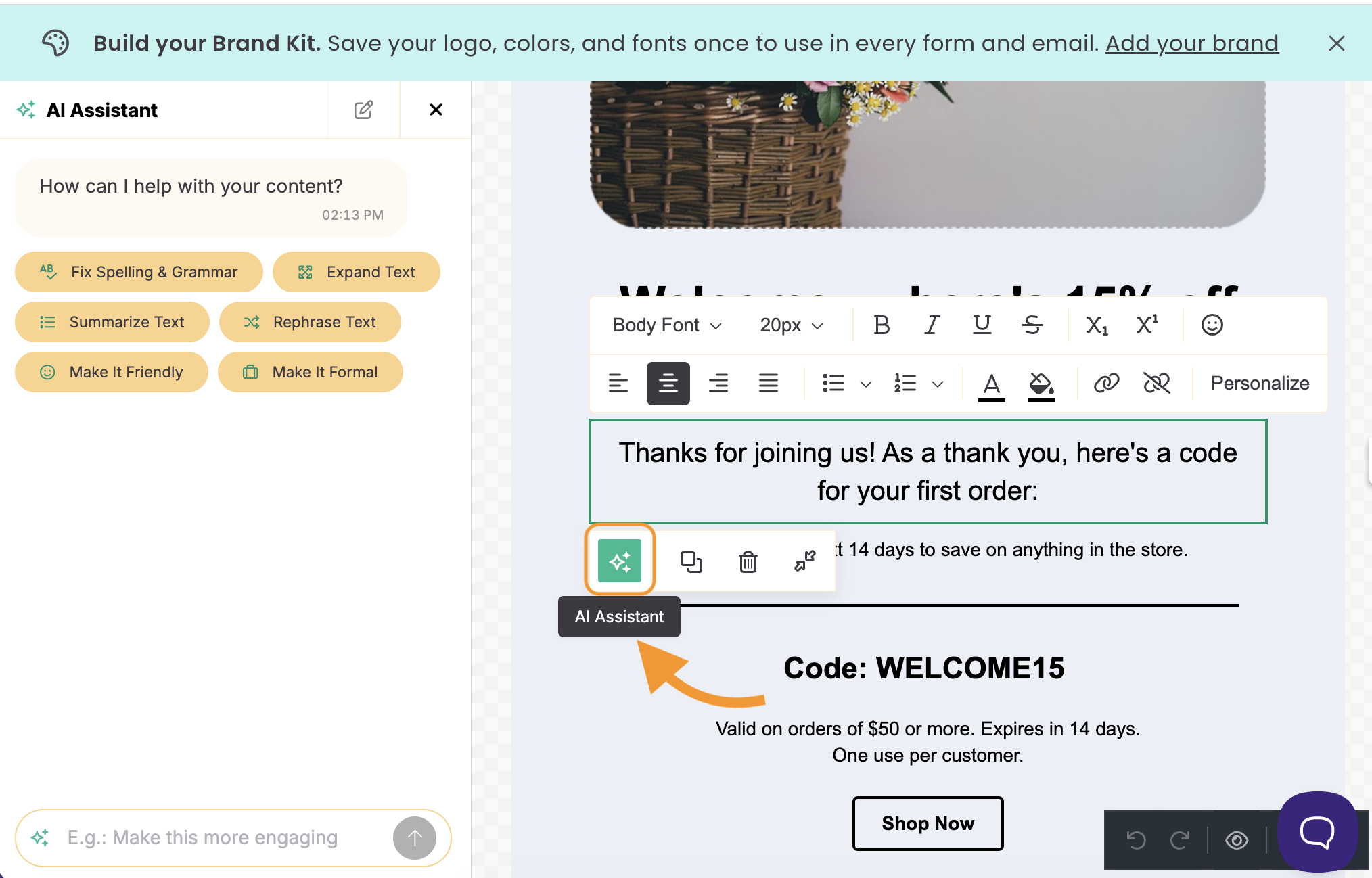
- In the AI window, you can choose a suggested prompt. You can also enter your own prompt.
For example:
- Write an enthusiastic headline announcing our fall sale. Include a line about our fall arrangements.
- Rewrite this paragraph to sound friendlier and more concise.
- The result will be applied immediately in the selected Block.
Be specific about tone, length, and audience. "Make it shorter and more upbeat for returning customers" gets better results than "make it better."
Generate or Edit an Image
- Click the AI icon on an image block.
- Describe the image you want to create, or describe how to change the current image.
- For example: Remove the people in this image.
|
Before |
After |
|---|---|
|
|
|


- Review the result and click Save to apply it to your block.
Edit a Section
- Click the AI icon on a section's toolbar.
- Describe the change.
- For example: Change this section to two columns.
AI Credits
Every AI Assistant request uses AI credits from your account. Your plan type determines the amount of AI credits allocated. AI credits renew each month with your billing cycle.
Here is the breakdown
- Free150
- Paid1,000
Complex prompts require more AI credits than shorter ones. For example, generating an image typically consumes more AI credits than rewriting a headline.
Frequently Asked Questions
Where can I use the AI Assistant in Benchmark Email?
The AI Assistant is available in the email builder and the form builder. Open it by clicking the AI icon on any block's toolbar.
Which blocks does the AI Assistant work with?
The AI Assistant works with heading, text, image, table, divider, social, and menu blocks. It also works on entire sections, so you can ask it to change columns or background colors.
Can the AI Assistant rewrite copy I already wrote?
Yes. Click the AI icon on the block that contains your copy and ask the AI Assistant to rewrite it. For example, to make it shorter, more persuasive, or more casual.
Can the AI Assistant edit my own images?
Yes. The AI Assistant can edit images already in your email or sign-up form, or generate new images from scratch.
What happened to the AI tools in the heading, paragraph, and image blocks?
The AI Assistant replaces the previous AI tools that were built into the heading, paragraph, and image blocks. All AI features now live in one place: the AI icon on the block toolbar.
How many AI Assistant credits do I get with Benchmark Email?
Free plans get 150 credits per month. Paid plans get 1,000 credits per month. Credits renew each month with your billing cycle.
Why did one request use more AI credits than another?
Bigger, more complex requests use more credits than short ones. Generating or editing an image, or making large changes, uses more credits than a quick headline rewrite.
What happens if I run out of AI credits?
New credits will be assigned when your account renews. If you are on a Free Plan, you could upgrade to increase the credit limit.