
Subscription Payments
After confirming your account subscription, your payment method is saved and used to automatically renew your account. If your payment method fails, you will experience service interruptions. To avoid service interruptions, ensure your payment method is up to date.
Topics Covered In this Article:
If your renewal payment fails, here's what will happen:
- During this time, you will not be able to send or schedule new emails.
- You'll have a 2-week grace period to complete your payment. We will try to process your payment during this time, and you can also log in to update your payment details at any time.
- If payment isn’t successful by the end of the grace period, your account will be automatically canceled.
To avoid account interruption, you can log in to update your information and make a successful payment. If your account is canceled, your data will be retained for up to 30 days.
If you need assistance, email us at Support@benchmarkemail.io
Payment Error Troubleshooting
There are several reasons why a payment method might fail. If this happens to you, make sure the following details are current and correct.
Credit Card Issues
- Billing Address
- Double-check that the billing address you entered matches the one on file with your card issuer. Even a small mismatch can cause the payment to fail.
- Updated Card Details
- If you’ve received a new card, the number may stay the same, but the expiration date and CVV often change. Be sure to update these details in your account to avoid declined payments.
- Expired Card
- If your card has expired, you’ll need to update your account with the new card information.
- Temporary Holds
- Unusual spending patterns or flagged transactions might cause your bank to temporarily block charges until you confirm them.
- Insufficient Funds
- Payments may fail if your card has reached its credit limit or doesn’t have enough available balance to cover the charge.
If everything appears to be fine, please contact your credit card issuer and report the payment failure.
Update Payment Method
To avoid any account interruption, update your account's payment information.
Here is how:
- Log in to your account. If a message appears to update your payment information, click to update.
- Click on your account avatar, and go to Account Settings.
-
Select Plans and Billing, and then click on Manage Payment Methods.
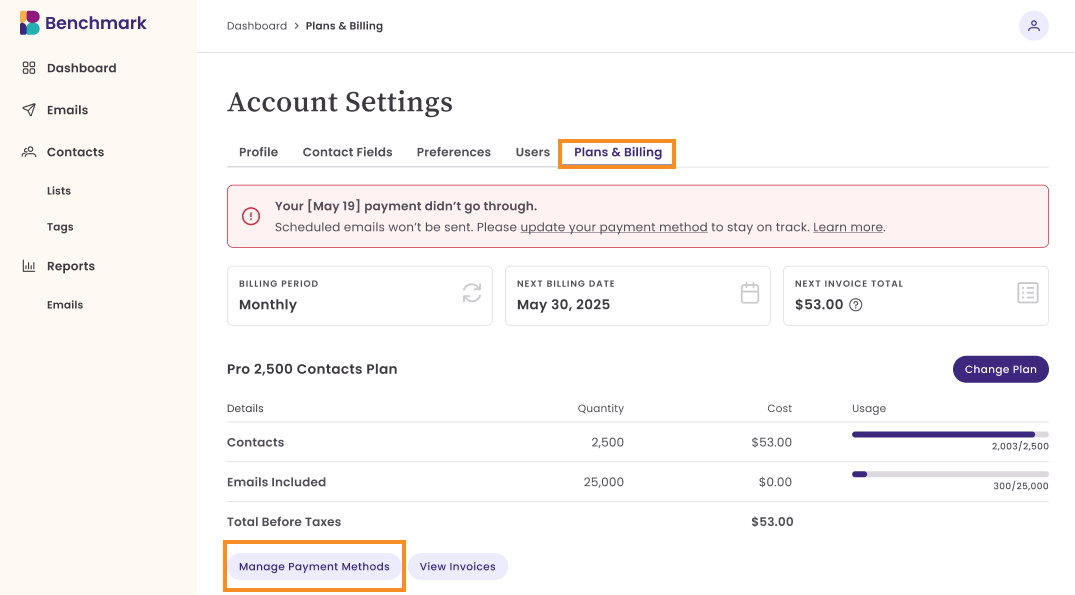
If you need help updating your billing information or have questions about your account, please reach out to our support team at Support@benchmarkemail.io.
Past-Due Account Status
If we're unable to process your subscription payment, your account will be marked as past due.
What this means for your account:
- During this time, your account usage is limited.
- Our system will attempt to process your account payment over a 2-week grace period.
- If a payment is successful, your account will be restored to active.
| What can you do during a past due status: |
Limitations |
|
|
What happens during the 2-week grace period?
Our system will automatically attempt to process a payment using the payment information in the account. If we are unable to process a payment during the 2 weeks, the account will be automatically canceled.
Account Cancelled
If your account is not paid within the 2-week grace period:
- Your account will be automatically canceled.
- You will lose access to your account, including the ability to log in, create emails, or manage contacts and users.
- You will only be able to log into your account to update billing information and renew your payment.
If your account is canceled, your data will be retained for up to 30 days. After this period of inactivity, the data will be permanently deleted from the Benchmark Email system. This process cannot be reversed.