
How to Add DNS Records to DNS Made Easy
To send emails using your private domain name, you will first need to add your domain and create a subdomain within your Benchmark account. After the subdomain has been added, Benchmark will generate the DNS record that you'll add to your DNS Made Easy account under Managed DNS.
This guide provides step-by-step instructions for adding the Benchmark DNS record to DNS Made Easy.
Topics Covered in This Article
Before Getting Started
- Benchmark does not have access to your DNS Made Easy account.
- Your DNS record is unique to the domain and subdomain you added to Benchmark.
- Once your record is created, find it under Email Settings > Domain.
- Propagation can take up to 48 hours.
- You cannot have a Wildcard record configured for the same name, as it would answer queries meant for your delegated subdomain.
How to Add Your DNS Record to DNS Made Easy
The instructions included in this article were developed using resources from DNS Made Easy.
- Log in to your DNS Made Easy account.
-
From the DNS menu, select Managed DNS, then select your domain.

- If you own more than one domain, select your domain name.
-
Under NS Records, click the + (plus) icon to add a new record.

-
Enter the NS record, using the values provided in Benchmark:
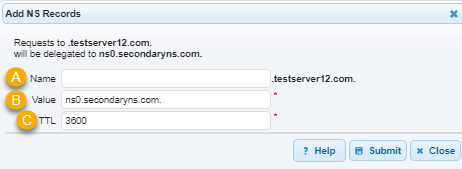
- Name: paste the host name provided in Benchmark.
- Value: paste the nameserver value provided in Benchmark.
- TTL: use the suggested time. If none is given, the default TTL is a reasonable choice.
- Click Add or Save to create the record.
After you have finished adding the record, you may return to your Benchmark account to complete the process. If you have navigated away from the records screen, you can still verify your work by checking your domain on the Domain page. From there, click the Retry Verification button next to the domain you are validating. This will initiate a web check to confirm whether the record was added successfully. Please note that DNS record propagation — once the record is valid on the web — can take anywhere from 24 to 48 hours.
If the record is not added, your domain's verification will remain pending.
Frequently Asked Questions
Will adding this record affect my existing website or email?
No. This record only applies to the subdomain you added in Benchmark — it doesn't change or remove any existing records on your root domain.
How long does it take for my record to be verified?
Most records are verified within a few hours, but DNS changes can take up to 48 hours to fully propagate. If your domain still shows as unverified after 48 hours, double-check that the record matches exactly what's listed on your Domain page in Benchmark.
I have a Wildcard record set up — can I still add this NS record?
Not on the same hostname. A Wildcard record would answer DNS queries for your subdomain instead of the nameservers you're delegating to Benchmark, so it needs to be removed or scoped to a different hostname first.
Can I add records for more than one subdomain?
Yes. Each subdomain you verify in Benchmark gets its own unique record. Add each subdomain in Benchmark first, then repeat the steps above for each one.