
Add DNS Records to Onamae
To send emails using your private domain name, you will first need to add your domain and create a subdomain within your Benchmark account. After the subdomain has been added, Benchmark will generate the DNS record(s) that you'll add to your Onamae (お名前.com) account under your DNS record settings.
This guide provides step-by-step instructions for adding the Benchmark DNS record(s) to Onamae account.
Topics Covered in This Article
Before Getting Started
- Benchmark does not have access to your Onamae account.
- Your DNS record(s) are unique to the domain and subdomain you added to Benchmark.
- Once your record(s) are created, find them under Email Settings > Domain.
- Propagation can take up to 48 hours.
How to Add Your DNS Record(s) to Onamae
The instructions included in this article were developed using resources from Onamae.
- Log in to your Onamae Navi account.
-
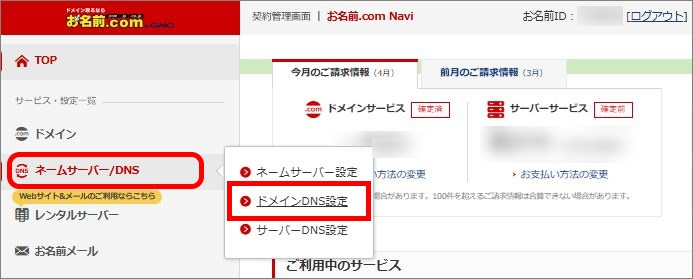
From the top menu, go to Name Server/DNS > DNS Record Settings (DNSレコード設定).
-
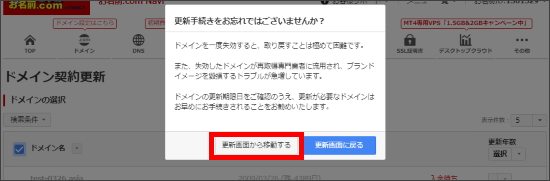
You may see a screen asking whether you forgot to renew your settings. Click "Proceed from renewal screen."
-
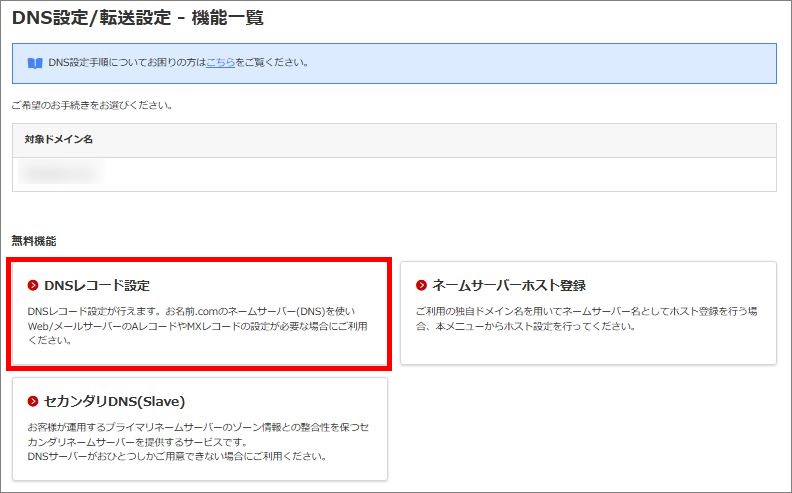
Select the domain you want to update from the domain list, then click DNS Record Settings.
-
Click the Add Record tab.
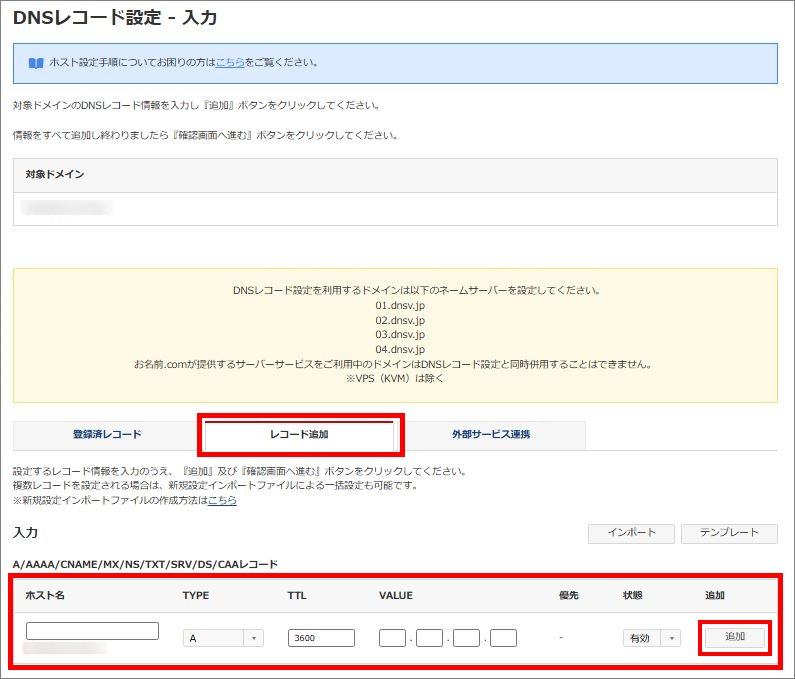
- Begin by adding the record(s) assigned in Benchmark. Add one record at a time:
- Host name: paste the hostname provided in Benchmark. Leave this blank if the record applies to the root domain.
- TYPE: select the record type provided in Benchmark (A, AAAA, CNAME, MX, TXT, etc.) from the dropdown.
- TTL: use the suggested time. If none is given, 3600 seconds (1 hour) is a reasonable default.
- VALUE/TARGET: paste the value provided in Benchmark — the exact field name depends on the record type.
- MX Priority: only required for MX records — use the priority value provided in Benchmark.
- Click Add to queue the record, then repeat step 5 for each remaining record.
- Once all records have been added, click Proceed to Confirmation Screen.
- Onamae may present an optional domain protection add-on — you can decline this if you don't need it.
- Review your record(s) on the confirmation screen, then click Set (設定する) to confirm. You'll receive a confirmation email once the change is complete.
After you have finished adding the record(s), you may return to your Benchmark account to complete the process. If you have navigated away from the records screen, you can still verify your work by checking your domain on the Domain page. From there, click the Retry Verification button next to the domain you are validating. This will initiate a web check to confirm whether the record(s) were added successfully. Please note that DNS record propagation — once the record(s) are valid on the web — can take anywhere from 24 to 48 hours.
If the record(s) are not added, your domain's verification will remain pending.
Frequently Asked Questions
Will adding these records affect my existing website or email?
No. These records only apply to the subdomain you added in Benchmark — they don't change or remove any existing records on your root domain.
How long does it take for my records to be verified?
Most records are verified within a few hours, but DNS changes can take up to 48 hours to fully propagate. If your domain still shows as unverified after 48 hours, double-check that each record matches exactly what's listed on your Domain page in Benchmark.
What if I can't find the DNS Record Settings option in my account?
Onamae's interface is available in both Japanese and English — look for "Name Server/DNS" or "ネームサーバー/DNS" in the top navigation. If you still can't locate it, contact Onamae's support team directly, since Benchmark doesn't have access to your Onamae account.
Can I add records for more than one subdomain?
Yes. Each subdomain you verify in Benchmark gets its own unique set of records. Add each subdomain in Benchmark first, then repeat the steps above for each one.