
GDPR Compliance for Signup Forms
If you collect email addresses through signup forms, you must ensure that the way you obtain and store consent complies with the General Data Protection Regulation (GDPR). This guide explains how our signup forms support GDPR requirements, what information you can include in your forms, and how to properly document and demonstrate user consent.
Topics covered in this article:
How Benchmark Forms Meet GDPR Requirements
Our signup forms are designed to help you collect explicit, informed, and unambiguous consent from subscribers — a key requirement under the GDPR (General Data Protection Regulation). This means:
- Consent must be given through a clear affirmative action, such as checking a box or clicking a submit button, accompanied by clear text explaining what is being agreed to.
- Users must be provided with transparent information about how their data will be used, who will use it, and their rights.
-
You must be able to demonstrate that consent was obtained.
Our forms support these principles by letting you:
Add a custom text block to your form that includes clear consent wording and a link to your Privacy Policy, so users can review detailed information before submitting their data.

GDPR Text that should be included in the form
To make your form GDPR-compliant, include the following elements:
Clear consent statement
Use concise, understandable language that explains exactly what the user is consenting to. For example:
By subscribing, I agree to receive marketing emails from [Your Company]. I have read and accept the Privacy Policy.
This ensures the user knows what they are opting into and links them directly to more information.
Link to your Privacy Policy
Provide a link to your privacy policy so visitors can read it before submitting their data. The text around the link should explain why you collect the email and how it will be used.
Examples of GDPR-Compliant Consent Wording
Below are several examples of consent language you may use within your signup forms. These examples can be adapted to your specific business model and communication purposes.
Example 1 – General Marketing Consent
By subscribing, I agree to receive occasional marketing emails from [Your Company], including updates, offers, and news. I understand I can unsubscribe at any time. I have read and accept the Privacy Policy.
Example 2 – Newsletter Subscription
I would like to receive the [Your Company] newsletter with updates, industry insights, and promotions by subscribing. I understand I can withdraw my consent at any time. See our Privacy Policy for more details.
Example 3 – Promotional Offers Only
By submitting this form, I consent to receive promotional communications from [Your Company]. I acknowledge that my personal data will be processed in accordance with the Privacy Policy.
Example 4 – Multiple Communication Types
I agree to receive marketing emails, product updates, and special offers from [Your Company]. I understand I can unsubscribe at any time via the link included in each email. Please review our Privacy Policy for information on how we process your data.
Example 5 – Event or Content Download Context
By registering, I agree to receive follow-up communications related to this event and occasional marketing emails from [Your Company]. I understand I may withdraw my consent at any time. Read our Privacy Policy for more information.
How to Add Consent Text to Your Signup Form
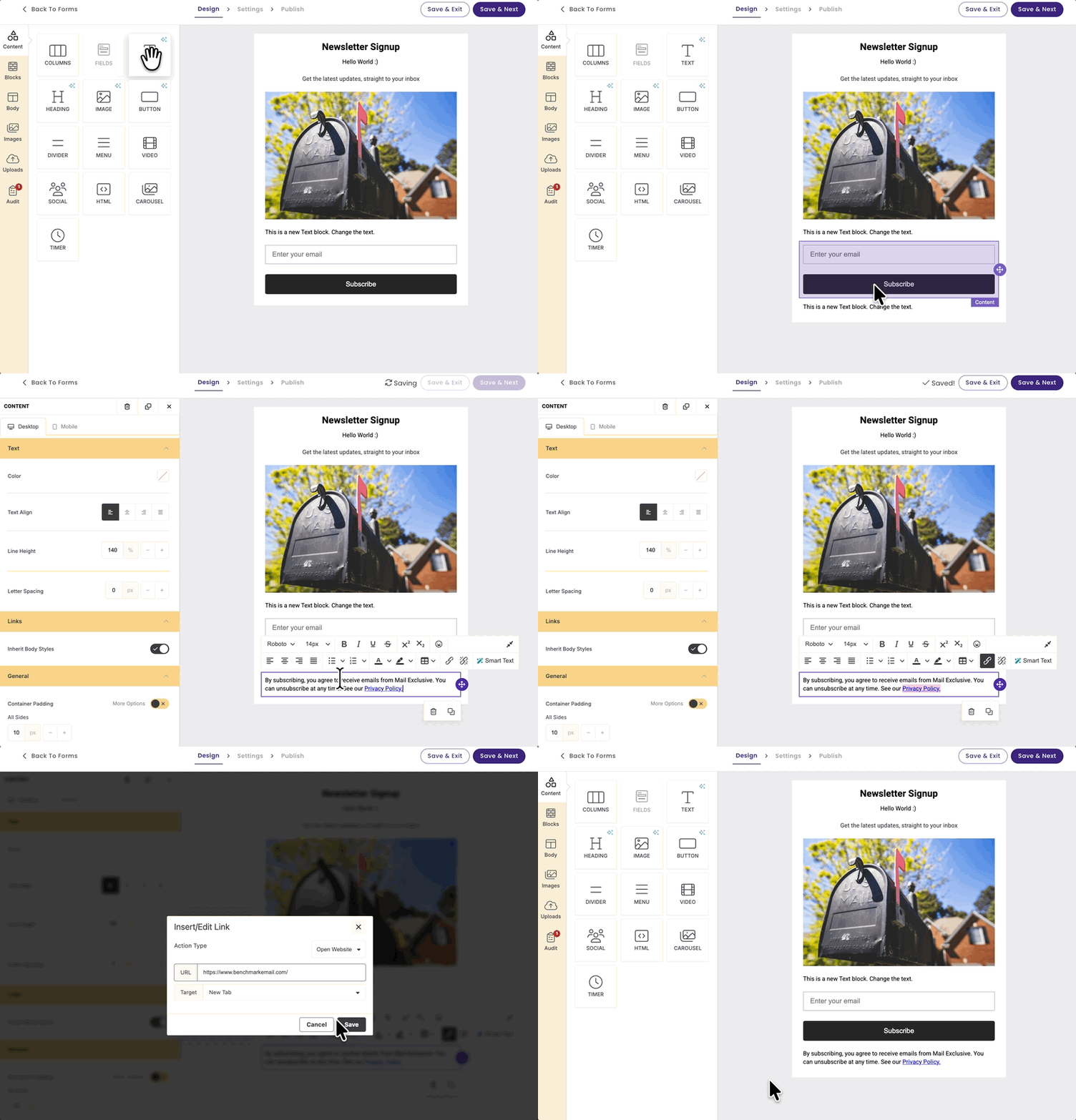
You can add your GDPR consent wording directly inside your form using the text block feature.
Follow these steps:
- Go to the Forms section in the left-hand panel.
- Click + Create Form to start a new form or edit an existing one.
- Once you have designed your form layout, drag a Text Block element into the form.
- Add your consent wording inside the text block.
- Use the formatting toolbar that appears above the text to:
- Insert a link to your Privacy Policy
-
Adjust formatting (bold, italics, alignment, etc.)
-
Save and publish your form once the consent wording has been reviewed.
💡 Tip
Make sure the consent wording is placed clearly below the submit button so users can read it before submitting their information.
How Can You Prove Consent Was Collected?
Under GDPR, if you rely on consent as your legal basis for processing data, you must be able to demonstrate that the person actively gave permission.
When someone submits their email through a Benchmark form:
- A new contact record is created in your account.
- The Activity Feed shows that the contact signed up using a specific form (form name included).
- The submission is automatically timestamped in the contact’s activity history.
This record helps demonstrate that:
- The contact actively submitted the form.
- The email address was not added manually or imported without consent.
- The subscription occurred on a specific date and time.
Important Best Practices
To strengthen your ability to show consent, we recommend:
- Keeping a copy of the exact form version and consent wording used at the time of collection.
- Clearly naming your forms (e.g., “Website Newsletter Signup – 2026 Version”).
- Storing your Privacy Policy version history.
Other Best Practices to Follow
Here are additional tips that help ensure GDPR compliance:
✔ Use clear, plain language — avoid legal jargon.
✔ Separate consent from terms of service or other agreements.
✔ Provide links to your full privacy information so users know their rights and how to exercise them.
Frequently Asked Questions
Can I collect consent just by having users click “Subscribe”?
Yes — as long as the action is clearly connected to the specific purpose of marketing consent and the form content makes that purpose clear.
Do I need to show the privacy policy inside the form?
You should include a link to the privacy policy and clear wording about how data will be used. This helps ensure the consent is informed.
What if my form collects data for more than one purpose?
If there are different types of processing (e.g., newsletters and third-party offers), you should obtain specific consent for each purpose.